How to bulk recolor SVG illustrations to match your brand (free)
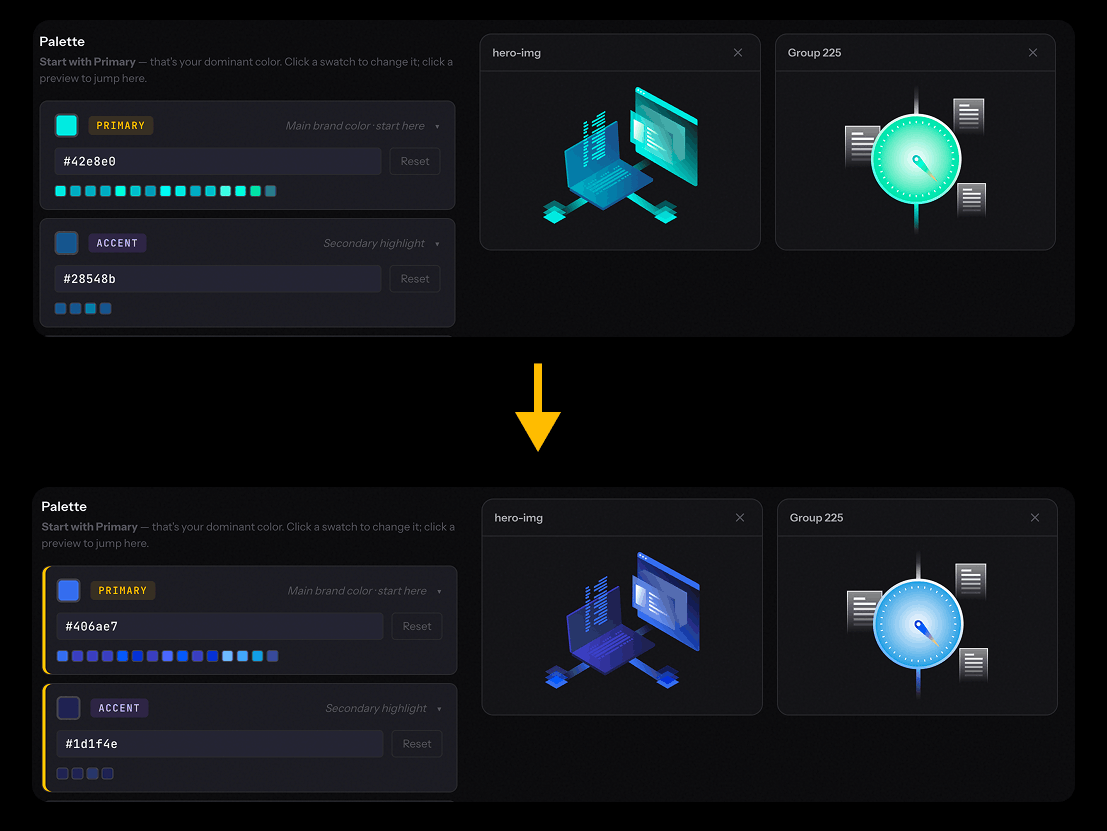
Freepik and unDraw illustrations look great — until you drop them into a branded page and realize the defaults don't match your palette. Freepik's editor lets you tweak colors one file at a time, but there's no batch workflow. unDraw's picker only changes the primary color, leaving accents, skin tones, and shadow shades on the defaults.
Here's a faster way using Color Swap — drop a batch of SVG illustrations, every color auto-groups into Primary / Accent / Skin / Neutral palettes, pick new brand colors, download. Related shades shift together so shading stays intact. Free, no signup, 100% in-browser.
Why existing methods fall short
Manual (Figma / Illustrator)
→ Open each file individually
→ Click every path, change fill
→ Easy to miss gradients and shadows
→ Adjusting each shade manually to keep lighting consistent
→ No undo across files
Color Swap
→ Drop up to 50 SVGs at once
→ Colors auto-group by role (Primary / Accent / Skin / Neutral)
→ One swatch change → all related shades shift proportionally
→ Live preview across every file
→ Single SVG or ZIP download
Files never leave your browser — SVGs are parsed, recolored, and exported locally. No signup, no server.
Step-by-step: bulk recolor SVG illustrations
1. Drop your SVGs
Open swap.ohiyo.app and drop up to 50 files (20 MB total, 5 MB per file). Freepik, unDraw, Flaticon, or any SVG export from Figma / Illustrator works.
2. Colors auto-group into palettes
Color Swap scans every fill and stroke across your files and groups colors by role: Primary (your dominant color), Accent, Skin, Neutral, plus Shadow and Light when present. Instead of 40 individual hexes to remap, you work with 4–6 palette groups.
3. Pick your brand colors
Start with Primary — that's the dominant color of the illustration. Click the group swatch, enter a hex (or use the picker). Every related shade in that group — darker tones, lighter tones, semi-transparent variants — shifts proportionally so shading and soft shadows stay intact. Repeat for Accent, Skin, Neutral as needed.
4. Download
Export a single SVG or hit Download for a ZIP of all recolored files. Original filenames stay intact. Alpha transparency is preserved — half-opacity highlights don't flatten into solid blocks.
What it works well for
- Freepik multi-color vectors — 4–8 colors across paths, gradients, and shadows. Freepik's editor handles single files; Color Swap is the fastest way to rebrand a batch.
- unDraw — beyond the primary — unDraw lets you change one color. Use Color Swap when you need to rebrand accents, skin tones, and shadow shades independently.
- Flaticon illustrations — same story as Freepik: an in-platform editor handles single icons, but no batch workflow. Typical 4–8 color palettes auto-group cleanly.
- Figma / Illustrator exports — if your team ships SVG illustrations and a client asks "can we see this in our palette?", it's 30 seconds.
- Theme variants — generate a light, dark, or alternate-brand version of an illustration set from a single source.
When you don't need Color Swap
Icon sets like Lucide and Heroicons use currentColor, so a single CSS rule in your stylesheet recolors them all — no tool required. Color Swap's sweet spot is multi-color illustrations where the colors are baked into the SVG itself.
About the pricing
Straight-up: Color Swap is free. No Pro tier, no upgrade prompt, no trial. Drop files, remap, download.
Why free: it's a focused tool that runs fully in the browser, and it doubles as an entry point to the rest of Ohiyo — AutoKit for SVG animation and IsoKit for isometric graphics — if you ever need more than recoloring.
If you like it, share it. If something breaks, email support@ohiyo.app.
Related tools
Color Swap is part of Ohiyo — a set of browser-based SVG tools: